




Building the right spare, on the right revision
Thursday afternoon, an urgent order reaches the plant: four drive shafts for a customer whose line has stopped. The planner moves the job ahead of a series order, material is prepared and machining starts the next morning. Two days later, quality notices that the parts were built to revision B. Engineering released revision C three months ago, and that is the version the customer’s machine needs.
The parts are scrapped, the job is repeated and the series order is delayed again. The plant has paid twice for the same spare part.
Every spare part is a small production order
For a Manufacturing Director, spare parts orders are a constant source of disruption. They arrive in small quantities, often urgently, and they compete with series production for the same machines, materials and people. A wrong order is not only a commercial problem. It is lost capacity, wasted material and a less stable production plan.
Where wrong spare parts orders come from
Most wrong orders are created long before they reach the shop floor. They usually come from the same few places:
- A catalogue that still offers superseded parts, because it works on a copy of engineering data that is updated later.
- Part numbers typed again by hand when an email or a portal order is entered into the ERP.
- Descriptions instead of references, which someone has to interpret and check with engineering.
Each of these steps adds time, and each one is a chance to build the wrong revision. We looked at the wider cost of this disconnection in The hidden cost of disconnected Windchill PLM and ERP systems.
See the difference in practice: follow the same spare part order with and without ISFsoft Spare Portal.
Simulation · Spare part order
Follow one spare part order to the plant
Four drive shafts, ordered urgently for a stopped machine. Switch between the two scenarios to compare the journey.
Result of this order
Illustrative example based on common situations in manufacturing companies.
Four changes when spare parts orders come from ISFsoft Spare Portal
ISFsoft Spare Portal is synchronized directly with Windchill, so every order starts from the same product data the plant uses. For production, this creates four changes.
1. The same data as production
Spare parts orders are based on the same product structure and revisions released by engineering. What the plant builds for the aftermarket is consistent with what it builds for new machines.
2. No more producing obsolete parts
When a component is superseded, the portal stops offering the old version immediately. The plant avoids the wasted material, rework and scrap caused by orders for outdated references.
3. Orders that arrive ready to plan
Through ISFsoft Connect, orders flow automatically into the ERP with the correct part numbers and quantities. Production planning receives clean demand instead of manual requests that need to be checked and corrected.
4. Fewer urgent interruptions
Wrong orders are the main cause of emergency rework. When customers order the right part the first time, spare parts can be scheduled alongside series production rather than interrupting it.
What the plant gains
- A more stable production plan, with fewer last-minute changes.
- Less scrap and rework caused by outdated references.
- An aftermarket served efficiently, without sacrificing the performance of core operations.
The same precision that engineering puts into each released change now reaches every spare part the plant builds. If you want to see how this works from engineering’s side, read Engineer once, serve everywhere.
Every spare part is a small production order, and it deserves the same precision as the rest.
Want to see how ISFsoft Spare Portal would send cleaner orders to your plant? Get in touch with us and we will show you how it works with a real product structure.


Where should your spare parts portal get its truth?
A customer’s machine has stopped. A technician opens the manufacturer’s spare parts portal, types a description and gets a long list of part numbers. Which one fits this machine? Is it still the current version? After ten minutes of searching, they pick up the phone. Someone in service calls someone in engineering. The portal was online, but the answer was not in it.
This happens often, even in companies that have already invested in a spare parts portal. In most cases the cause is the same: the portal gets its product information from a system that doesn’t really know the product.
Why most spare parts portals are connected to the ERP
Most spare parts and partner portals on the market are built on top of the ERP. It is a logical choice. The ERP knows prices, stock, customers and orders, which is everything needed to complete a sale. For a portal whose goal is to take orders, starting from the ERP looks like the shortest path.
The difficulty appears earlier, at the moment the customer needs to find the part.
What the ERP doesn’t know about your product
An ERP holds part numbers and flat lists. It does not hold the product structure, the 3D geometry, the revision history or the configuration of each machine. That information lives in the PLM, where engineering creates and maintains it.
For a customer looking for a spare part, that context is exactly what matters. They rarely know the reference. They know the machine, the serial number and the area where the part is located. A portal built only on ERP data expects the customer to arrive with a code. A portal built on product data helps them find it.
Four differences when the spare parts portal draws from Windchill
ISFsoft Spare Portal takes a different approach. It takes product knowledge from PTC Windchill and uses the ERP for what it does best: price, availability and order processing. In practice, this creates four differences.
1. Identification, not just a catalogue of codes
An ERP-based portal expects the customer to know the reference. With ISFsoft Spare Portal, customers can find it through the bill of materials, the serial number or by navigating the interactive 3D model, with drawings and documentation attached. They identify the part by looking at their machine, not by guessing a code.
2. Engineering changes, straight from the source
In an ERP-based portal, an engineering change reaches customers only after it has been transferred and coded in the ERP, which often adds delays. Linked to Windchill, the portal reflects each released change and supersession as soon as engineering approves it. Customers stop ordering parts that have already been replaced.
3. No separate catalogue to create and maintain
Portals fed from the ERP usually need exploded views and illustrated catalogues that someone creates and updates by hand. It is slow and costly work, and every manual copy is a new opportunity for errors. ISFsoft Spare Portal reuses the 3D models and product structures that engineering already maintains in Windchill, so there is no second catalogue to keep in sync. If your catalogue still lives in spreadsheets, we looked at that first step in From Excel to digital portal.
4. The configuration of each machine
ERP data rarely reflects how a specific unit was built and how it has been modified over the years. Windchill does. As a result, customers see only the parts that fit their equipment, not every part that has ever existed for that model.
Giving each system its role
This is not about replacing the ERP. It is about letting each system do what it does best:
- Windchill defines what the part is and where it fits: structure, revisions, 3D models, documentation and configuration.
- The ERP decides how much it costs and when it ships: prices, stock, orders and invoicing.
With ISFsoft Connect, both sides work together. Orders placed in the portal reach the ERP with the correct part numbers and quantities, without anyone typing them again. If your Windchill and ERP still exchange data through spreadsheets, this article explains the risks of that approach.
The result is a spare parts portal that is both precise and transactional.
Five questions to ask before choosing a spare parts portal
Before comparing solutions, it helps to look at how your current portal works. Answer these five questions and see where you stand.
Self-assessment · 1 minute
Is your spare parts portal getting its truth from the right place?
Answer five questions about your current portal and see where you can improve.
Where you can improve most:
Want to see how ISFsoft Spare Portal would work with your product data?
Precision first, then the transaction
Customers judge a spare parts portal on one thing: whether the part that arrives is the part they needed. Speed, availability and a good ordering experience all matter, but only after that. A portal that sells the wrong part efficiently is still selling the wrong part.
In the coming weeks, we will look at what a spare parts portal linked to Windchill means for each area of the business: engineering, manufacturing, after-sales service, purchasing and sales.
Want to see how ISFsoft Spare Portal works with your Windchill data? Get in touch with us and we will show you how it works with a real product structure.

If your Windchill and ERP are "connected" by Excel files, you don't have an integration, you have a workaround
Most manufacturing companies running Windchill will tell you they already have some kind of connection with their ERP. And technically, they are right. Data moves between the two systems. BOMs get transferred. Item lists are updated. Engineering changes eventually make their way into production.
The question is how.
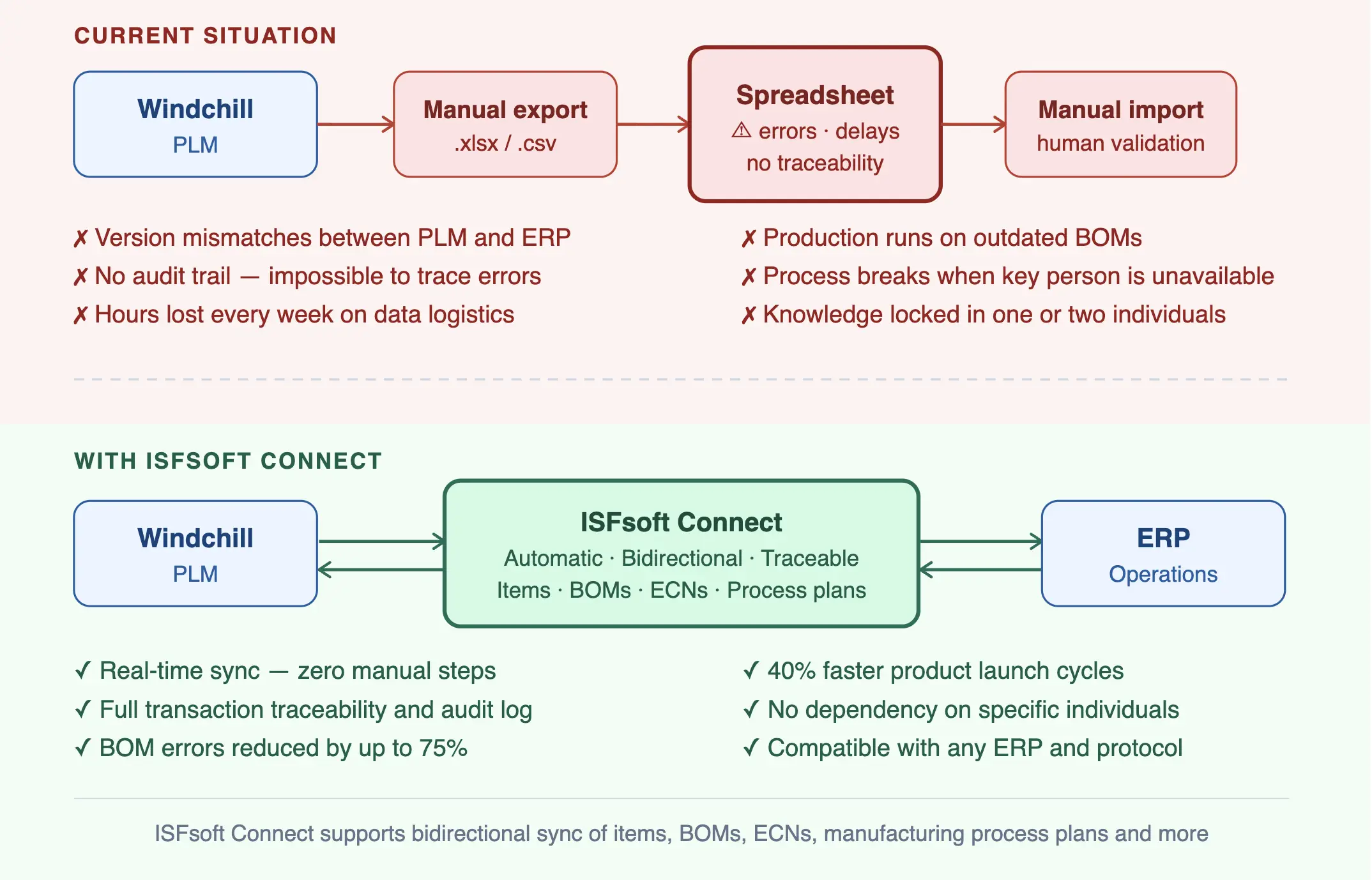
In the vast majority of small and mid-sized industrial companies, the answer is the same: someone exports data from Windchill into a spreadsheet, works on it, and uploads it into the ERP. Or the other way around. Sometimes with a bit of scripting on top. Sometimes entirely by hand.
That is not an integration. That is a workaround that has become invisible because everyone has learned to live with it.
How spreadsheet-based transfers become the standard
This is not a criticism of the people who set it up. When a company first implements Windchill and an ERP, a full real-time integration is rarely the priority. There is a go-live deadline, a limited budget, and a team that needs to start working. Someone figures out a process using export files, it works well enough, and it becomes the de facto method.
Years later, that same process is still running. It has been documented, it has been handed from one person to the next, and it has become so embedded in daily operations that nobody questions it anymore. It is just how things work here.
The problem is not the spreadsheet itself. The problem is what happens when the business grows, the product catalogue expands, the pace of engineering changes accelerates, and the volume of data that needs to move between systems increases. What was manageable at fifty items becomes a liability at five hundred.
The real cost of moving data through files
Spreadsheet-based transfers between Windchill and ERP create a specific set of problems that rarely show up in a single dramatic failure. They accumulate quietly, in the background, until they become impossible to ignore.
Version mismatches
By the time a file is exported, processed, reviewed and imported into the ERP, the source data in Windchill may have already changed. Engineering revisions move faster than manual transfer cycles. Production ends up working from a BOM that is one or two iterations behind the current design — and in many cases, nobody knows until something goes wrong on the shop floor.
Human error at every step
Every manual intervention in the transfer process is a potential point of failure. A column mapped incorrectly. A row accidentally deleted. A filter applied to the wrong field. These are not exceptional events. They are routine, and they have routine consequences: rework, incorrect procurement orders, and inventory built around obsolete configurations.
Dependency on specific people
In most companies using this model, the transfer process is only fully understood by one or two individuals. When those people are unavailable — on holiday, sick, or simply gone — the process slows down or stops entirely. The organization has built a critical operational dependency around a manual routine.
No traceability
When data moves through a spreadsheet, the audit trail disappears. If a BOM error is discovered three months later, tracing it back to a specific file version, a specific transfer, or a specific decision is extremely difficult. For companies operating in regulated industries or with strict quality requirements, this is not just an inconvenience — it is a compliance risk.
The time nobody accounts for
Someone has to prepare the file, validate it, send it, confirm receipt, and troubleshoot when something does not match. This work does not show up in any integration budget because it is absorbed by the team as part of their normal workload. But it represents real hours, every week, spent on data logistics instead of engineering or operations.
Spreadsheet-based transfer vs. real-time integration with ISFsoft Connect
When the workaround stops working
There are usually clear signals that the spreadsheet transfer model has reached its limit, even if they are not immediately recognized as integration problems.
Engineering change cycles slow down because the effort required to push changes through to ERP creates a bottleneck. Product launches take longer than they should because teams spend days reconciling data before anyone can commit to a manufacturing plan. Quality incidents increase and trace back to BOM inconsistencies between what engineering defined and what production received. And the people managing the transfer process start spending more and more time on it, with less and less time for anything else.
At this point, the question is no longer whether to improve the integration. The question is how long the organization can afford to wait.
What a real integration between Windchill and ERP looks like
A proper integration does not mean replacing the spreadsheet with a more sophisticated spreadsheet. It means eliminating the manual transfer step entirely.
When Windchill and ERP are connected through a dedicated integration layer, product data flows automatically and in a controlled way. New items created in Windchill are reflected in ERP without manual intervention. BOM structures and revisions are synchronized as soon as they are released. Engineering Change Notices trigger the corresponding updates in ERP in real time. And every transaction is logged, traceable and auditable.
The operational impact is significant. Version mismatches disappear because there is no delay between the source data and the downstream system. Errors caused by manual handling are eliminated. The people who were managing the transfer process are freed to do higher-value work. And the organization gains a level of operational confidence in its data that simply does not exist when spreadsheets are in the middle.
ISFsoft Connect: built for Windchill environments
ISFsoft Connect is an integration platform designed specifically to connect Windchill PLM with ERP systems. It works as an Enterprise Service Bus, managing the synchronization of product data, engineering structures and operational information between both platforms in a controlled, bidirectional and traceable way.
The processes it supports cover the full scope of what companies currently manage through manual transfers: item creation and updates, BOM synchronization, Engineering Change Notice and ECO flows, manufacturing process plans, and option and variant expressions. All of it automated. All of it logged.
ISFsoft Connect also handles the heterogeneity that is typical in real industrial environments — different ERP systems, different data formats, different protocols — without requiring companies to standardize their entire technology stack first.
The result is an integration that does not depend on a spreadsheet, does not depend on a specific person, and does not introduce a manual step between what engineering defines and what operations receives.
If your Windchill–ERP connection currently runs through files, that is where to start.